How do I get started with Zamar?
You can typically download Zamar from your app store, install it on your device, and start using the app right away. However, if you want to create your own sets and share them with others, you need to create an account. Simply follow the on-screen instructions to create an account and start using these features
How can I get help or contact support؟
You can contact the Zamar team through our official Facebook and Instagram pages. These channels are the fastest way to ask questions, report issues, or share feedback.
Can I request new features or songs in the app?
Yes, the Zamar team welcomes feedback and feature requests to serve your worship community better.
Will my data be safe in Zamar?
Zamar does not share user data with third parties, and the app’s privacy policy outlines how personal information is handled.
Do I need an account to use Zamar?
No. But having an account allow you to save and sync your profiles, libraries, and sets across devices, sharing and backups.
Can Zamar transpose song keys?
Yes, Zamar includes a key transpose feature that lets you change the key of a song to fit your voice or instrument easily.
How can I get Zamar?
You can download Zamar from:
- Apple App Store (iPhone, iPad, Mac)
- Google Play Store (Android devices)
Search for “Zamar – Worship App.”
- Apple App Store (iPhone, iPad, Mac)
- Google Play Store (Android devices)
Search for “Zamar – Worship App.”
Who is Zamar for?
Zamar is ideal for:
- Worship leaders planning services and sets
- Musicians learning and practicing songs
- Church teams who want organized worship music libraries
- Individual worshipers who want an easier way to engage with worship music
Whether you’re a beginner or experienced musician, Zamar adapts to your needs.
- Worship leaders planning services and sets
- Musicians learning and practicing songs
- Church teams who want organized worship music libraries
- Individual worshipers who want an easier way to engage with worship music
Whether you’re a beginner or experienced musician, Zamar adapts to your needs.
What is Zamar?
Zamar is a worship-focused music app designed to help worship leaders, musicians, and worshipers organize, access, and manage worship music and resources. It simplifies finding songs, organizing sets, transposing keys, and practicing worship music.
How can I change the font size in the printouts?
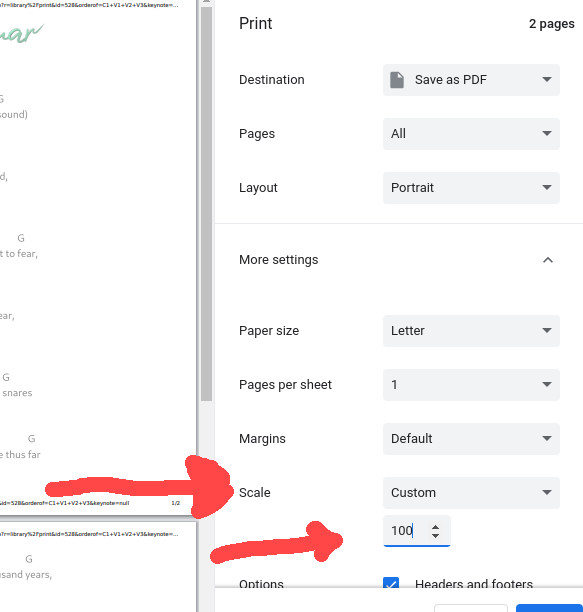
It's very easy to change the font size in the printouts but, it is your browser (Chrome, Safari, Edge, Firefox) that does it. So it is a little different for each browser. Here is how to do it in chrome:
When you hit the "Print" button you will see the Chrome printout where you need to go to "More settings" and then to "Scale" and set it to "Custom." Then you can change the scale percentage to whatever you want and that directly changes the font size. See the picture below:
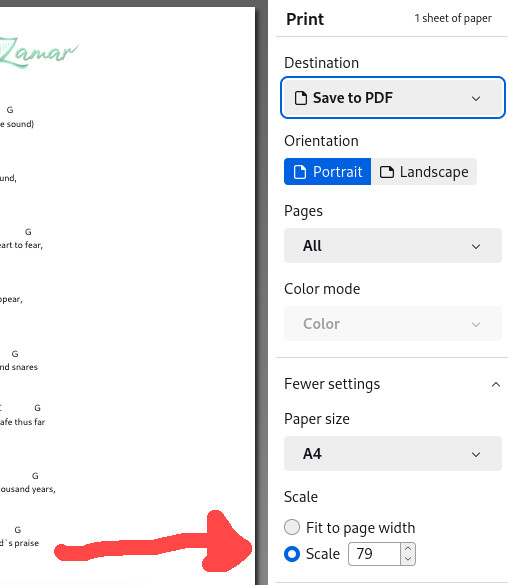
For Firefox it is the following. Go to "Settings" and simply change the "scale" to change the font size as in the following:
If you have another browser then it is surely something like one of the above examples.
When you hit the "Print" button you will see the Chrome printout where you need to go to "More settings" and then to "Scale" and set it to "Custom." Then you can change the scale percentage to whatever you want and that directly changes the font size. See the picture below:
For Firefox it is the following. Go to "Settings" and simply change the "scale" to change the font size as in the following:
If you have another browser then it is surely something like one of the above examples.
What does 'Zamar' mean?
The Hebrew word "Zamar" means "to make music," "to sing praises," or "to play musical instruments." It is often associated with the act of praising God through music, particularly by using string instruments and singing. "Zamar" is used in the context of worship and musical praise in the Bible.
“Sing praises (Zamru) to God, sing praises (Zameru): sing praises (Zamru) unto our King, sing praises (Zameru)”. Ps 47:6
“Sing praises (Zamru) to God, sing praises (Zameru): sing praises (Zamru) unto our King, sing praises (Zameru)”. Ps 47:6
Is Zamar only for worship music, or can it be used for other genres as well?
Zamar is exclusively designed for worshiping God through music and is specifically intended for Christian worship music. Its purpose is to enhance the worship experience within the context of Christian worship and faith.
Is Zamar available for different devices and platforms?
Zamar is available on multiple platforms, including iOS and Android devices, as well as on any web browser.
How can I support Zamar?
There are several ways to support Zamar:
1- Pray for the team, the app, and its users.
2- Spread the word about Zamar to friends, family, and fellow worshipers.
3- Provide feedback and suggestions for improvements.
4- Consider making a donation through the Zamar website to contribute to app development.
1- Pray for the team, the app, and its users.
2- Spread the word about Zamar to friends, family, and fellow worshipers.
3- Provide feedback and suggestions for improvements.
4- Consider making a donation through the Zamar website to contribute to app development.
Is Zamar free to use?
Yes, the app is free to download and use. There are no required purchases to start organizing or accessing worship music.
Does Zamar help with learning or practicing music?
Yes! Zamar includes practice tools like:
- A built-in metronome
- A tuner
- A chord library
Additionally, Zamar provides video lessons and resources to support your worship music journey.
- A built-in metronome
- A tuner
- A chord library
Additionally, Zamar provides video lessons and resources to support your worship music journey.
Can I share my music sets with others using Zamar?
Absolutely! Zamar allows you to create music sets by grouping songs together, and you can easily share these sets with your team via email or social media.
Does Zamar support key transposition?
Yes, Zamar includes a key transpose feature that lets you adjust the key of your music to fit your voice or instrument.
How do I find and filter my music in Zamar?
You can categorize and organize songs in the app by:
- Key
- Artist
- Tag
- Author
- Custom criteria you define
This makes your worship music library flexible, searchable, and easy to manage.
- Key
- Artist
- Tag
- Author
- Custom criteria you define
This makes your worship music library flexible, searchable, and easy to manage.